Dry January Calendar
Start a 31-day alcohol-free calendar, tap each day as you go, and watch your alcohol-free days and current run add up.
Free · runs in your browser · nothing is uploaded
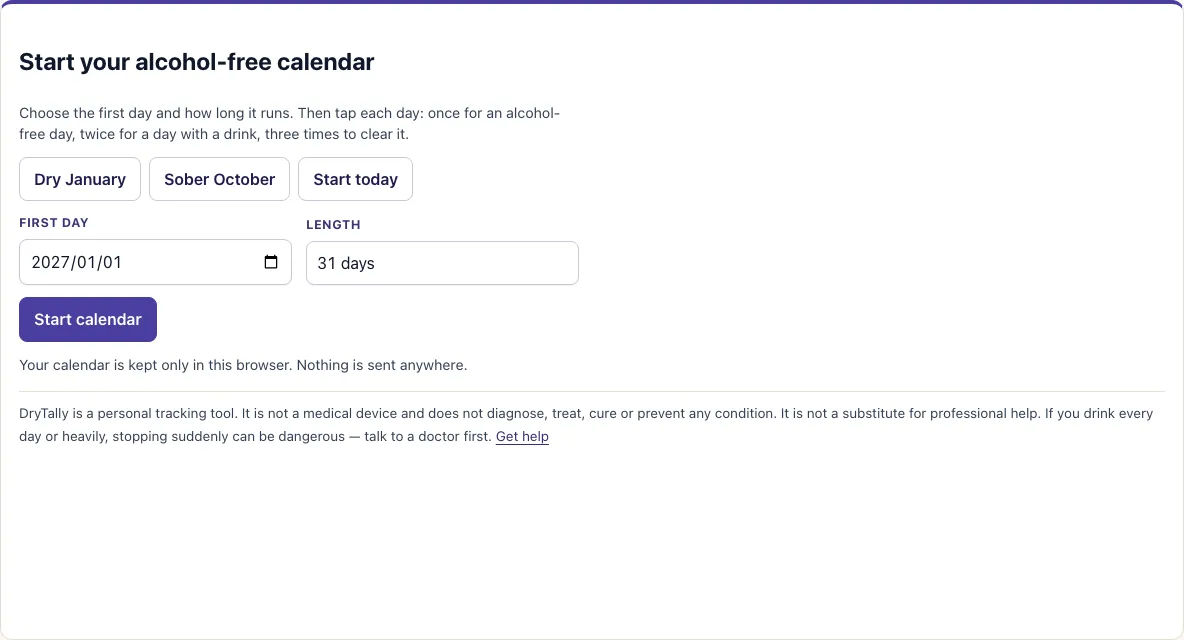
How to use the Dry January calendar
- Choose a start. Tap Dry January to fill in 1 January. In January itself, this sets this January; at other times it sets the coming one. Tap Sober October to set 1 October, or Start today to use today’s date. You can also type a date into the First day box.
- Open the Length dropdown and pick 31 days, 30 days, 28 days, 60 days or 90 days.
- Press Start calendar. Each day appears as its own button, with the first day under the right weekday and Monday at the start of the row.
- Tap a day once to mark it amber, which means an alcohol-free day. Tap it again to mark it rose, which means a day with a drink. Tap a third time to clear it. Days in the future cannot be marked.
- Check the four tiles at the top and the legend beside them. Amber is an alcohol-free day, rose is a day with a drink, and dashed means not marked yet. Today has an outline so you can find it quickly.
Below the calendar, Print calendar prints it for the wall or fridge. Start a new calendar asks you to confirm, then clears the current calendar and its marks, so only use it when you are ready to begin again.
How do I track Dry January?
Tap each day once it has passed, or on the day itself. Mark an alcohol-free day amber, or a day with a drink rose, and the tool adds it to the totals. Only marked days count toward your numbers.
Unmarked days in the past are not counted as alcohol-free. They show as open (dashed), so the totals only hold days you marked. If you miss a day, the number of alcohol-free days will not include it until you mark it.
Here is a worked example. A 31-day calendar starts on 1 January. The 1st, 2nd, 3rd and 5th are alcohol-free, and the 4th has a drink. The 6th is still open. The tool shows 4 alcohol-free days, 1 day with a drink, a current run of 0, a longest run of 3, 1 day not marked (the 6th) and 25 days left. The calendar ends on 2027-01-31.
What happens if I have a drink during Dry January?
A day with a drink ends your current run, but it never removes the alcohol-free days you already marked. Your alcohol-free total stays the same, and the next alcohol-free day you mark starts a new run.
In the example above, the drink on the 4th splits the month into two parts. The run of 3 from the 1st to the 3rd remains the longest run, and the 5th still counts as an alcohol-free day. The 4th appears in the Days with a drink tile. The tool records what happened and does not judge it, so you can mark the next day as it comes.
Can I use this for Sober October or another month?
Yes. Tap Sober October to start the calendar on 1 October. You can also set any first day you like and choose a length from the dropdown. The calendar suits any 28 to 90 day challenge, so it is not limited to January.
How are the days counted in the calendar?
Each day you tap becomes an alcohol-free day or a day with a drink. The current run counts alcohol-free days in a row up to today, the longest run is the best run so far, and days with a drink never remove the alcohol-free days you already have. The table shows a worked example for the first six days of a January calendar.
| Day | You mark it | Alcohol-free days | Current run | Longest run |
|---|---|---|---|---|
| 1 January | Alcohol-free | 1 | 1 | 1 |
| 2 January | Alcohol-free | 2 | 2 | 2 |
| 3 January | Alcohol-free | 3 | 3 | 3 |
| 4 January | Drink | 3 | 0 | 3 |
| 5 January | Alcohol-free | 4 | 1 | 3 |
How this tool works and where the numbers come from
Alcohol-free days are the days you mark as alcohol-free. The current run is the number of alcohol-free days in a row ending today; a day that is unmarked or marked as a drink ends it. Nothing is guessed: unmarked past days are shown as open and are not counted.
Sources
Frequently asked questions
Can I print a Dry January calendar?
Yes. Press Print calendar below the calendar to print it for the wall or the fridge. The printout shows your marks as they stand when you print.
Is my calendar saved if I close the page?
Your calendar and your marks are saved only in this browser. Nothing is sent anywhere. If you clear the site data, or open the page in another browser or on another device, you start fresh.
Who runs Dry January?
Dry January is a yearly challenge to go alcohol-free for the month of January. In the UK it is run by the charity Alcohol Change UK.
What if I drink every day?
This tool only tracks your days. It does not give medical advice. If you drink heavily or every day, stopping suddenly can be dangerous, so talk to a doctor before you change how much you drink.
Can I start the calendar on a date in the past?
Yes. Choose any first day in the First day box, then tap the days that have already passed to fill them in. Days in the future cannot be marked until they arrive.
Does a day with a drink end the calendar?
No. It ends the current run only. Your alcohol-free days stay counted, and you can carry on marking days to the end of the calendar.
Related tools
- Alcohol-free days counter: use it when you only want a count of your alcohol-free days.
- Alcohol tracker: use it when you want to log what you drink, not just whether you drank.
- Money saved not drinking calculator: use it to estimate how much you keep by not buying drinks.
- Drink-free days planner: use it to plan which days ahead you want to be drink-free.
- Drinks per week calculator: use it to work out how many drinks you have in a typical week.
- Cut down drinking planner: use it if you want to reduce gradually instead of stopping for a set period.